Frequently asked questions
30 straight answers about letting AI agents pay with Veyra: setup, limits, approvals, fees, plans and data.
About Veyra
What is Veyra?
Veyra is a financial permission layer for AI agents. You connect a wallet you already own, set what each agent may spend, and give the agent one MCP endpoint. The agent can then ask to pay for things, and Veyra checks every request against your limits on its own server, outside the model, before any money moves.
Who makes Veyra?
Veyra is made by Zapx Labs, which builds AI products including Veyra's open-source MCP connector (zapxlabs/veyra-mcp on GitHub).
Is Veyra a wallet or a custodian?
No. Your wallet stays the payment rail and the money stays in it. Veyra never holds funds and never asks for a seed phrase or private key; for wallets it stores only public addresses and which wallet provider you used. It handles authorisation, policy, approvals and the agent-facing MCP interface.
Which AI agents and apps can use Veyra?
Any MCP client that can connect to a remote MCP server and send an Authorization header with a bearer token. Veyra has step-by-step guides for Claude Code, Cursor, OpenAI Codex, VS Code with GitHub Copilot, Windsurf (now Devin Desktop), the OpenAI Agents SDK, LangChain and n8n, and for adding a payment tool to Claude or ChatGPT.
Can Claude or ChatGPT make payments?
Not on their own. A model can only call tools that you connect to it. If you connect Veyra over MCP, the model can call create_payment, and Veyra decides whether that payment is refused, held for your approval or paid, based on your limits. What each host lets you connect, and how it authenticates, differs, so check the setup guide for your app.
Does Veyra support x402, AP2, ACP or MPP?
No. Veyra doesn't implement the x402, AP2, ACP or MPP protocols, and it doesn't issue cards. It gives an agent MCP tools to request USDC payments on Base to an address, under limits you set. The guides explain how those protocols differ and where a permission layer fits next to them.
Read more: How to let an AI agent make payments · ACP, AP2, x402 and MPP compared · Veyra docs · Watch: Veyra in 16 seconds
Setting up
How do I connect an agent to Veyra?
Sign up, connect a payment source, then create an MCP endpoint for the agent and set its spend policy. Veyra shows the endpoint URL (https://veyra.money/api/mcp) and a veyra_ bearer token once. Add both to your MCP client's configuration, keeping the token in an environment variable or secret store rather than in a file you commit.
Which wallets can I connect?
MetaMask, Phantom, Base or Coinbase Wallet (including the Base app's passkey popup), and other mobile wallets through WalletConnect. There is also a Simulated source that moves no real money. Whichever wallet you use, Veyra's real payments are USDC on Base.
Which networks and currencies does Veyra support?
Veyra's real payments run in USDC on Base only. It doesn't pay in other tokens or on other networks, and it doesn't make card payments or bank transfers. An endpoint's policy can also restrict which assets and networks its agent may request.
Can I test without spending real money?
Yes. Attach the Simulated source to an endpoint and the agent's payments go through the same policy checks and approvals, then settle on a simulated rail with the status confirmed_simulated. No money moves, and the MCP tools tell the agent never to report a simulated payment as a real one.
Is there a mobile app?
No. Veyra is a web app. You can approve payments from a phone browser, using a mobile wallet through WalletConnect or the Base app's passkey popup, and you can turn on browser notifications for approval requests.
Read more: Add a payment tool to Claude Code · Add a payment tool to Cursor · Test agent payments without real money
Limits and approvals
What limits can I set for an agent?
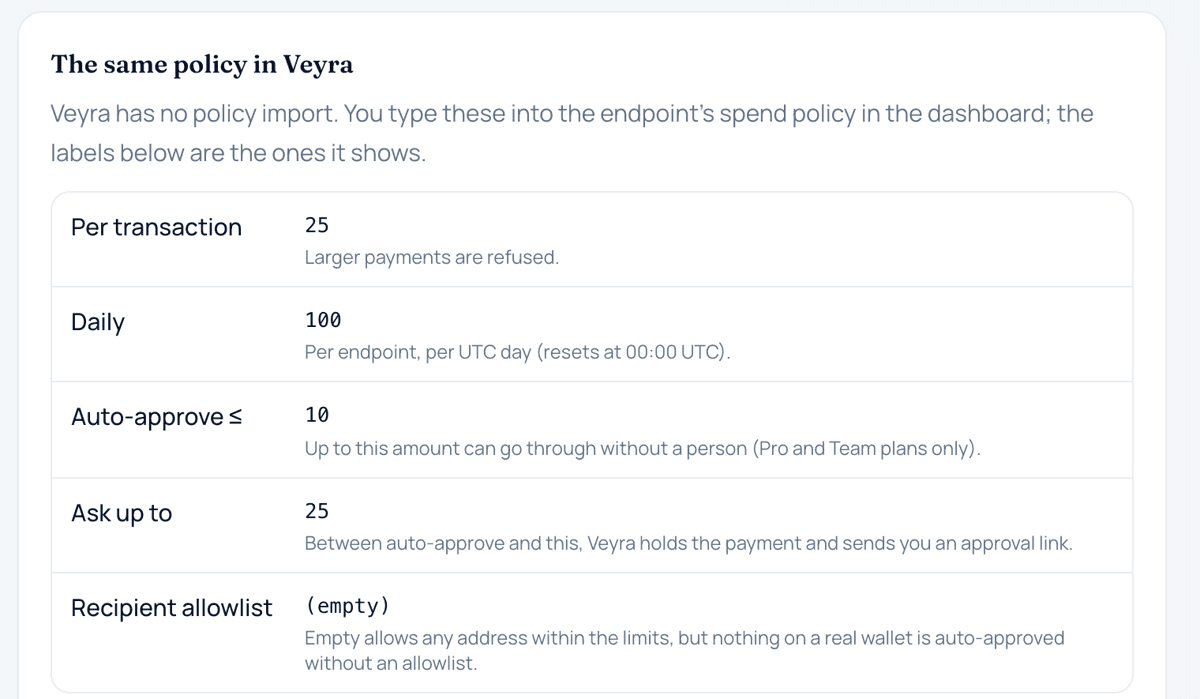
Each endpoint has a per-payment limit, a daily limit, an auto-approve limit, an ask limit and an optional recipient allowlist of wallet addresses. The daily limit counts per endpoint per UTC day and resets at 00:00 UTC. The same controls are available on every plan.
What happens when an agent asks for a payment?
Veyra refuses anything over the per-payment limit, over what is left of the daily limit, above the ask limit, or to an address outside a non-empty allowlist. Between the auto-approve and ask limits it holds the payment and sends you an approval link. At or below the auto-approve limit it can pay unattended, but only on a paid plan, to an allowlisted address, from an on-chain allowance that covers it. Otherwise it asks you.
How do approvals work?
When a payment needs a person, the agent receives a link to give you. You open it, connect the same wallet the payment will come from, and sign the USDC transfer yourself, or decline it. You don't need to log in to Veyra to approve. A pending payment lapses after 24 hours if nobody acts, and each link is short-lived, so open a fresh one from the dashboard if it has expired.
What is auto-pay?
On Pro and Team, small payments at or below your auto-approve limit can go through without you. You grant a capped USDC allowance on Base from your wallet, and Veyra's relayer sends allowlisted payments from it. Pro includes up to 500 auto-pay executions a month and Team up to 2,000. On the Free plan every payment is approved by you.
Why did a small payment ask for my approval instead of paying automatically?
Usually one of these: the endpoint has no recipient allowlist (an empty allowlist turns unattended payment off), you are on the Free plan, there is no on-chain allowance covering the amount, or this month's auto-pay executions are used up. In each case Veyra falls back to asking you rather than refusing or pretending the payment went through.
Can prompt injection make my agent spend money?
An injected instruction can make an agent ask for a payment, but it can't change Veyra's limits, because they are enforced on Veyra's server, not in the prompt. The most it can move is what your policy already allows, and an allowlist stops unattended payments going to an address you didn't choose. Approval requests show the amount, recipient and reason, so check them before you sign.
How does Veyra stop duplicate payments?
Every create_payment call needs an idempotency key. A retry with the same key returns the same payment instead of paying twice; a new key is a new payment. The agent is told to check get_payment or list_payments when it is unsure whether a payment worked, rather than paying again.
Read more: How to set spending limits for an AI agent · Human approval for AI agent purchases · Free spending policy generator
Money and fees
Does Veyra take a fee on payments?
No. Veyra charges a monthly subscription for the paid plans, not a percentage of the payments your agents make.
Who pays the network fee?
When you sign a payment in your own wallet, your wallet submits it, so it needs a little ETH on Base for the network fee. For auto-pay, Veyra's relayer submits the transfer from your allowance. Granting that allowance is itself a transaction you sign and pay the fee for.
Can a payment be reversed or refunded?
No. Once a payment confirms on-chain it is final. Neither Veyra nor anyone else can reverse, refund or recover it. Only let an agent pay recipients you trust, and use the allowlist. If Veyra itself approved or executed something it shouldn't have, report it from the Help page with the payment ID.
How do I prove a payment happened?
Once a payment confirms on Base, get_payment returns its on-chain transaction reference and a block explorer link. The agent can show those to the recipient, and you can see the same record in your audit log.
Read more: Stablecoin payments for AI agents · Stop an AI agent making duplicate payments · Help and report an issue
Plans and billing
Is Veyra free?
There is a Free plan at £0 with 1 active MCP endpoint, 2 connected payment sources, the full set of spending limits, a 7-day audit log and manual wallet approval on every payment.
How much do Pro and Team cost?
Pro is £19 a month: up to 10 endpoints and 10 payment sources, a 90-day audit log, and auto-pay for up to 500 small on-chain payments a month. Team is £79 a month: up to 50 endpoints and 50 sources, a 1-year audit log with CSV export, and auto-pay for up to 2,000 payments a month.
Do paid plans get stronger controls?
No. The per-payment, daily, auto-approve and ask limits and the recipient allowlist work the same on every plan. Plans differ in the number of endpoints and sources, audit log history and export, and how many payments can run unattended each month.
How do I cancel a paid plan?
Pro and Team are monthly subscriptions billed through RevenueCat, and you can cancel any time. You keep the paid plan until the end of the period you've paid for; after that the account is on the Free plan.
Read more: Pricing
Security, data and control
Does Veyra ever see my private key?
No. Veyra never collects or has access to private keys or seed phrases. Payments you approve are signed in your own wallet, and auto-pay uses an allowance you grant on-chain, capped at the amount you choose.
What data does Veyra store?
Your name, email and a hashed password; the public addresses of wallets you connect and which provider you used; your endpoints and policies; and payment records (amount, recipient, network, timestamps, the policy decision) as an audit trail. Product analytics run on PostHog in the EU with typed text masked. Veyra doesn't sell your data.
How do I stop an agent from paying?
From the dashboard you can pause an endpoint, rotate its credential if the token may have leaked, or revoke it; a paused or revoked endpoint can't pay. Reject any payments still waiting for approval. If you granted an auto-pay allowance, revoke it in your wallet too, because that lives on-chain.
How do I delete my account data?
Use Help, then Report an issue, with the subject Privacy request, and Veyra will respond directly. Records of on-chain transactions can be removed from Veyra's systems but not from the blockchain itself.
Read more: How to revoke an AI agent's payment access · Can prompt injection make an agent spend money? · Privacy policy
Try it on a simulated wallet
Create an endpoint, set limits and watch your agent's payments get refused, held or paid, without real money. Switch the source to your own wallet when you're ready.
Not answered here? See the guides, the glossary, the docs or Help.
This page explains how agent payments and the related technology work. It is not financial, investment, legal or tax advice. Protocols and provider features change; check the linked official sources before relying on a detail.