Connecting a payment tool
How to give an OpenAI Agents SDK agent a payment tool
Connect a remote MCP payment server to an OpenAI Agents SDK agent with MCPServerStreamableHttp, a bearer header from the environment and a pause before paying.
Open an MCPServerStreamableHttp with the server's url and an Authorization: Bearer header read from an environment variable, pass it to Agent(mcp_servers=[server]), and set require_approval so create_payment pauses the run until a person approves it. Limits belong on the payment server, not in your agent code.
Why is this harder than it sounds?
Agents built with the SDK run in your own code, often on a server with nobody watching, so there is no editor confirmation unless you add one. The SDK offers two routes to an MCP server: a server object your process connects to (Streamable HTTP, SSE or stdio), or a hosted MCP tool where OpenAI's Responses API calls the server on the model's behalf. They handle credentials and approvals differently. And the SDK's approval hook for local MCP servers can't see the call's arguments, so it can't tell a small payment from a large one; any check on amount or recipient has to happen on the payment server.
How do you do it?
- Create a credential and set your environment. Make a dedicated endpoint with small limits and a simulated source. Install the SDK with pip install openai-agents, and export OPENAI_API_KEY and VEYRA_TOKEN in the environment the agent runs in.
- Connect with MCPServerStreamableHttp. from agents import Agent, Runner; from agents.mcp import MCPServerStreamableHttp. Then: async with MCPServerStreamableHttp(name="veyra", params={"url": "https://veyra.money/api/mcp", "headers": {"Authorization": f"Bearer {os.environ['VEYRA_TOKEN']}"}, "timeout": 10}, cache_tools_list=True, require_approval={"always": {"tool_names": ["create_payment"]}}) as server: agent = Agent(name="Buyer", instructions="…", mcp_servers=[server]). The SDK's MCP docs show this params shape, headers included.
- Handle the approval pause. When approval is needed, the run stops and result.interruptions lists the pending calls. The SDK's human-in-the-loop docs say to call state = result.to_state(), then state.approve(item) or state.reject(item) for each one, and resume with await Runner.run(agent, state). Show each pending call to a person before approving it.
- Expose only the tools you need. The SDK's MCP docs describe tool filtering with create_static_tool_filter(allowed_tool_names=[…]). A purchasing agent may only need get_budget, create_payment, get_payment and list_payments.
- Check the tools load. Run a task that asks the agent to report its payment budget. It should call get_budget and read your limits back. If you change the server's tools later, note that cache_tools_list keeps the old list until you call invalidate_tools_cache().
- Test on the simulated source. Give the agent one task that needs a small payment and one that lands in your approval band. Check that the first settles as simulated, and that for the second the agent reports the approval link instead of creating another payment.
- Write the payment rules into the instructions. Tell the agent when it may pay, to reuse the same idempotency key when retrying a payment, and never to start a new payment while one is awaiting approval.
What it does not mean
- The SDK's require_approval is not the payment server's approval. The first pauses your run before the tool is called; the second holds the payment itself until the wallet owner signs. You can use both.
- A require_approval callable on a local MCP server is not a place for an amount check. The SDK's docs say it doesn't receive the call's arguments or call ID.
- cache_tools_list does not cache payment results. It only saves re-fetching the list of tools.
- A run that finishes is not proof a payment went through. A status of confirmed_simulated means no real money moved, and awaiting_approval means nothing has moved yet.
Common questions
Should I use HostedMCPTool instead?
The hosted tool has OpenAI's Responses API call a publicly reachable server for you, with require_approval and an on_approval_request callback in the SDK. OpenAI's API docs describe an authorization field for the token and say it isn't stored, so it is sent with every request. Veyra hasn't documented that route, so test it on a simulated source first.
Can I use MCPServerSse?
The SDK's docs mark HTTP with SSE as deprecated and recommend Streamable HTTP or stdio for new integrations. Use MCPServerStreamableHttp for a remote payment server.
Where does the token live?
In an environment variable read at start-up, as in the SDK's own example. OpenAI's guidance is to keep access tokens in authorization fields or headers rather than URLs.
Where does Veyra fit?
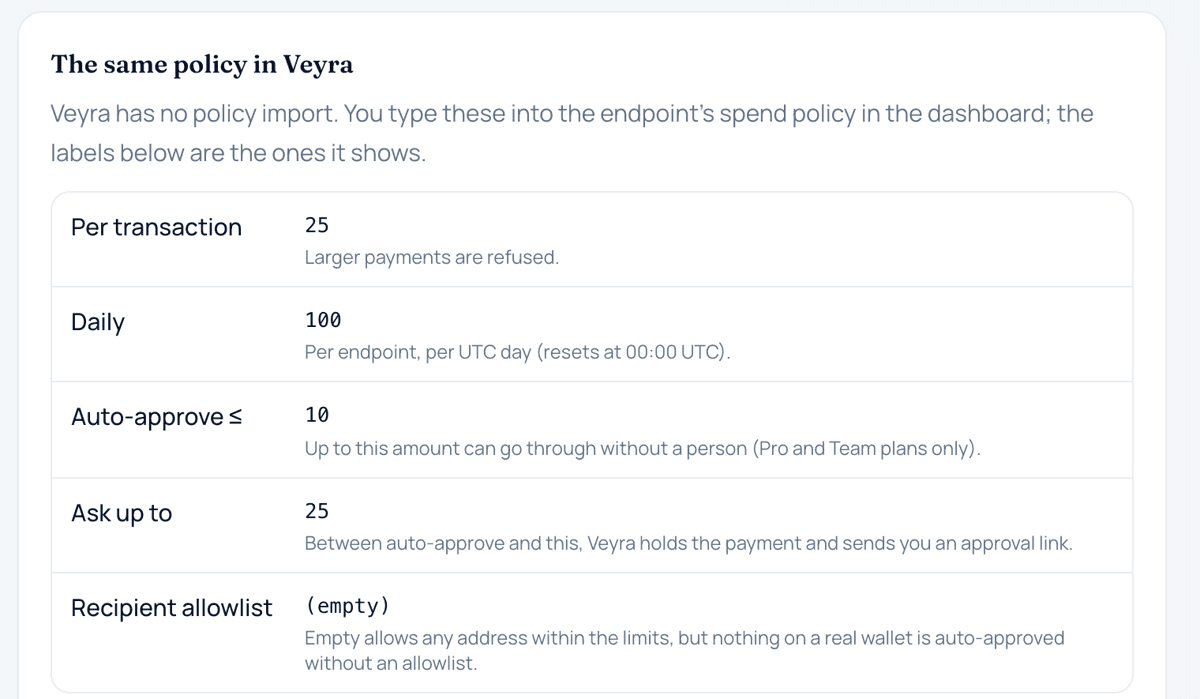
Veyra fits the MCPServerStreamableHttp route as written: one endpoint at https://veyra.money/api/mcp, a static Authorization: Bearer veyra_… header, and MCP over HTTP POST (the SDK's docs mark SSE as deprecated, and Veyra doesn't offer it). Veyra's docs don't include an Agents SDK walkthrough; the setup above uses only the documented endpoint and header. Policy is enforced server-side: per-payment and daily limits, the auto-approve and ask limits, and the recipient allowlist. A payment in the ask band returns awaiting_approval with a next_action.url for the owner, and an approval nobody acts on lapses after 24 hours, which matters for agents that run on a schedule.
Sources
Terms on this page
- MCP serverAn MCP server is a service that offers tools, resources or prompts to AI applications using the Model Context Protocol, an open protocol built on JSON-RPC 2.0.
- Idempotency keyAn idempotency key is a unique value a client attaches to a request so that, if the same request is sent again with the same key, the server returns the original result instead of performing the action a second time.
- Auto-approve limitAn auto-approve limit is the largest single payment an agent may make without a person approving it, within any other caps that apply.
This page explains how agent payments and the related technology work. It is not financial, investment, legal or tax advice. Protocols and provider features change; check the linked official sources before relying on a detail.