Connecting a payment tool
How to add a payment tool to an n8n AI Agent
Attach a remote MCP payment server to n8n's AI Agent with the MCP Client Tool node and a Bearer credential, expose only the tools it needs and add human review.
Attach an MCP Client Tool node to the AI Agent node's tools, point it at the payment server's endpoint, authenticate with a Bearer credential holding the token, and set Tools to Include to only the tools the workflow needs. For unattended workflows, put the payment tool behind n8n's Human review step.
Why is this harder than it sounds?
n8n agents usually run from triggers with nobody watching: a webhook, a schedule, an incoming email or form. Whatever text the trigger brings in reaches the model, and an AI Agent node doesn't ask anyone before calling a tool unless you add a review step. n8n's one-click MCP registry signs you in with OAuth, but a server that isn't in the registry needs the MCP Client Tool node and a credential you create. n8n's own pages also differ on transport: the MCP Client Tool page labels its field SSE Endpoint, while the MCP Client node documents a Server Transport setting. A server that only speaks Streamable HTTP needs the right choice there.
How do you do it?
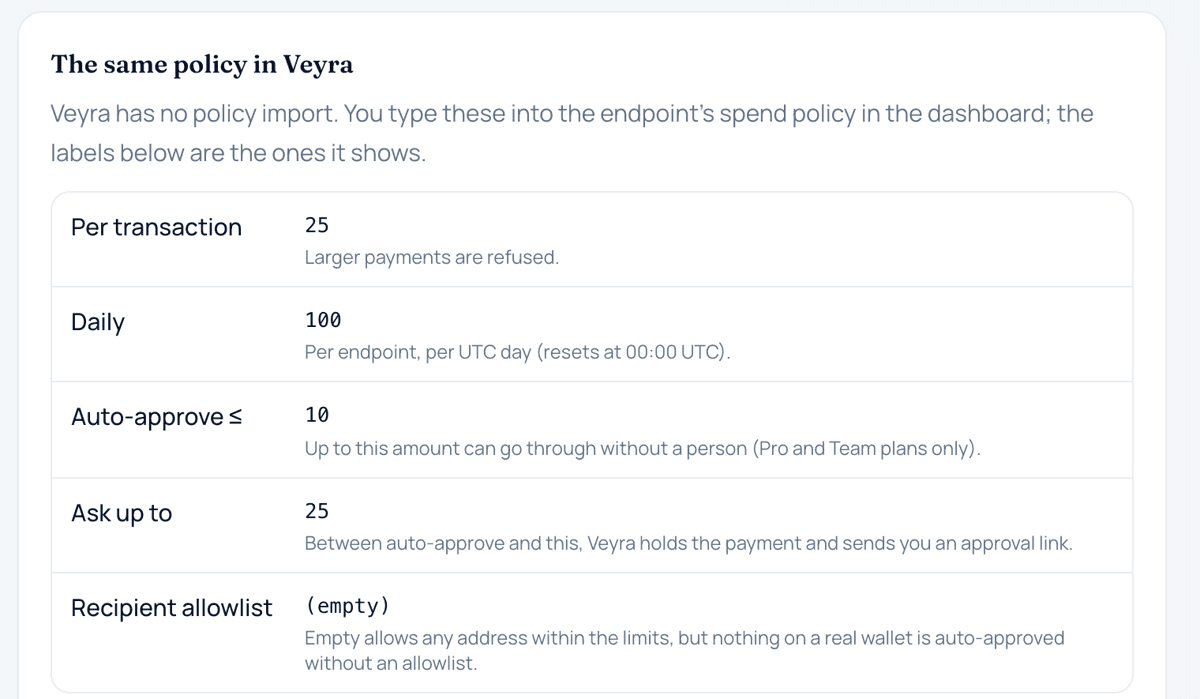
- Create a credential with low limits. Make a dedicated endpoint for the workflow with small per-payment and daily limits, a recipient allowlist if the workflow only pays known services, and a simulated source to start with.
- Store the token as an n8n credential. Create a Bearer auth credential and paste the token into Bearer Token. n8n's credential docs say bearer auth is header auth with the Name set to Authorization and the Value set to Bearer <token>, so a header credential works too. Don't type the token into a node field or an expression.
- Attach the MCP Client Tool. Open the AI Agent node's tools connector, add an MCP Client Tool node, and enter https://veyra.money/api/mcp as the endpoint. If your node shows a Server Transport option, choose HTTP Streamable. Set Authentication to Bearer and select the credential.
- Expose only the tools the workflow needs. Set Tools to Include to Selected and pick, for example, get_budget, create_payment, get_payment and list_payments. n8n's docs describe All, Selected and All Except.
- Add a human review step. n8n's docs describe clicking the Tools connector on the AI Agent node, finding the Human review section, choosing a channel such as Chat, Slack, Discord, Telegram, Microsoft Teams or Gmail, and attaching the tools that need approval. A denied call is cancelled and the agent is told. The page doesn't say whether review can target one tool inside an MCP Client Tool node, so test it with a simulated payment.
- Test with a manual execution. Run the workflow by hand with a prompt that needs one small payment and one in your approval band. Check the execution log shows the tool calls, the first settles as simulated, and the second returns awaiting approval.
- Write the rules into the system message. Tell the agent when it may pay, to pass any approval link to a person, and never to create a new payment while one is awaiting approval.
What it does not mean
- The MCP Server Trigger node is the other direction. n8n's docs say it exposes n8n tools to outside agents; it doesn't connect your agent to a payment server.
- The MCP Client node is not the agent tool. It runs one chosen tool as an ordinary workflow step, which suits a payment whose amount the workflow already knows, while the MCP Client Tool lets the agent decide.
- Tools to Include is not a spending limit. It decides which tools the agent can see, not how much any call may spend.
- Approving a call in n8n's Human review is not the same as signing the payment. Above your auto-approve limit, the payment still waits for the wallet owner.
Common questions
Should I use the MCP Client Tool or the MCP Client node?
Use the MCP Client Tool when the agent decides whether and what to pay. Use the MCP Client node when the workflow already knows the payment and you want it as a fixed step; n8n's docs describe it as running MCP tools as regular workflow steps.
The node won't connect. What should I check?
The transport first, since Veyra doesn't offer SSE. Then the credential: Bearer auth with the full veyra_ token, or a header named Authorization with the value Bearer followed by the token. A rotated or revoked token also fails.
Does approving in n8n send the money?
Not necessarily. n8n's review lets the tool call run; Veyra then applies its own policy, and anything above your auto-approve limit waits for a signature in your wallet.
Where does Veyra fit?
Veyra connects through the MCP Client Tool with a Bearer credential: endpoint https://veyra.money/api/mcp, header Authorization: Bearer veyra_…. It has no OAuth sign-in, and it speaks Streamable HTTP over POST, not SSE, so a node that only offers an SSE endpoint won't connect. Veyra's docs don't have an n8n page; the setup above uses only the documented endpoint and header. Policy is enforced on Veyra's server. A payment in the ask band returns awaiting_approval with a next_action.url, which the agent can post to the same channel you use for review, and approvals nobody acts on lapse after 24 hours. On the Free plan every payment needs approval in your wallet, so an unattended workflow will always stop and wait.
Sources
Terms on this page
- MCP serverAn MCP server is a service that offers tools, resources or prompts to AI applications using the Model Context Protocol, an open protocol built on JSON-RPC 2.0.
- Auto-approve limitAn auto-approve limit is the largest single payment an agent may make without a person approving it, within any other caps that apply.
- Recipient allowlistA recipient allowlist is a list of approved payees, such as wallet addresses, that a payment system checks before it lets an agent pay; payments to anyone not on the list are held or refused.
This page explains how agent payments and the related technology work. It is not financial, investment, legal or tax advice. Protocols and provider features change; check the linked official sources before relying on a detail.