Connecting a payment tool
How to add a payment tool to Windsurf
Windsurf is now Devin Desktop. Where its local agent reads MCP servers, how to add a payment server with a bearer header, and how to keep the token out of git.
Windsurf is now Devin Desktop, and its local agent, Devin Local, replaced Cascade. Add the payment server to an mcp_config.json under mcpServers with its url, transport "http" and an Authorization header, using the gitignored .devin/mcp_config.local.json or your user file rather than the shared project file.
Why is this harder than it sounds?
Most Windsurf instructions you will find were written for Cascade. Cognition renamed Windsurf to Devin Desktop on 2 June 2026, made Devin Local the main local agent, and said the legacy Cascade agent would stay available only through 1 July. Devin Local reads MCP servers from three files: a project file that is meant to be checked into version control, a gitignored local override, and a user file. Devin's docs describe environment-variable expansion only for OAuth fields, not for headers, so a bearer token in a header sits in the file as plain text. That makes the choice of file the main thing standing between your payment credential and your git history.
How do you do it?
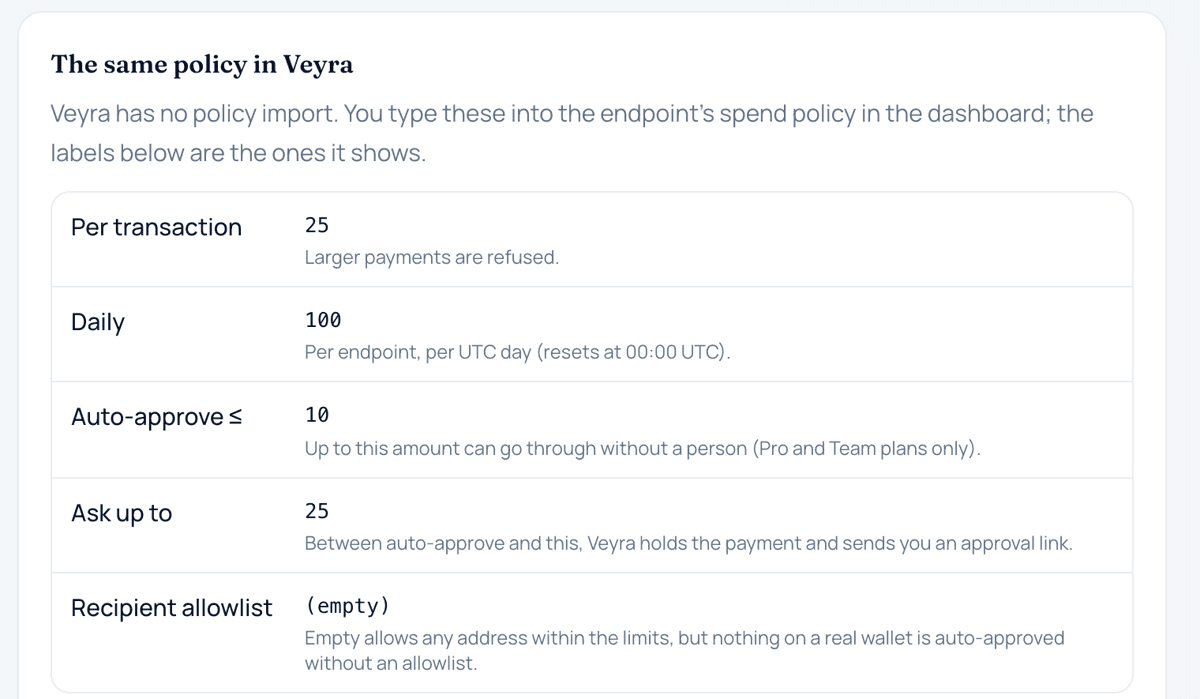
- Create a credential with low limits. Make a dedicated endpoint for Devin Desktop with small per-payment and daily limits, a recipient allowlist if you know who it should pay, and a simulated source to start with.
- Pick a file that isn't committed. Devin's docs list .devin/mcp_config.json (project, shared through version control), .devin/mcp_config.local.json (local, gitignored, and the default for new servers) and ~/.config/devin/mcp_config.json (user; %APPDATA%\devin\mcp_config.json on Windows). Use the local or user file for a payment token.
- Add the server entry. Add: { "mcpServers": { "veyra": { "url": "https://veyra.money/api/mcp", "transport": "http", "headers": { "Authorization": "Bearer veyra_…" } } } }. Devin's configuration reference lists url, transport ("http" for Streamable HTTP, the default for URL servers, or "sse") and headers for custom HTTP headers. The devin mcp add command can add a URL server, but no header flag is documented, so add the header by editing the file.
- Check the server loads. Open Customize from the Agents window and select the MCPs tab: servers for your open folders are listed there, and you can toggle them, open their config file or refresh the list. From the CLI, devin mcp list and devin mcp get veyra show the same. Then ask the agent to read your payment budget; it should call get_budget and report your limits.
- Test on the simulated source. Ask for one small payment and one in your approval band. The first should settle as simulated; the second should come back awaiting approval, and the agent should hand you the link and stop.
- Keep per-call approval for payments. Devin's docs say Devin Local prompts for approval before calling any MCP tool by default, and that you can allow one tool or every tool on a server, for the session or permanently. Allowing get_budget permanently is reasonable; leave create_payment prompting.
What it does not mean
- The rename doesn't mean Cascade-era instructions still apply. Devin Local reads its own config files, and Cognition said the legacy Cascade agent would remain available only through 1 July 2026.
- The project file .devin/mcp_config.json is not private. Devin's docs describe it as checked into version control, so a token in its headers is in your repository.
- Choosing to always allow every tool on the server is not a budget. It removes your look at each call; the limits that remain are the ones on the payment server.
- A server showing as enabled in the MCPs tab doesn't prove the header works. Only a successful tool call does.
Common questions
Does my old Windsurf MCP config still work?
Cognition's Devin Desktop FAQ says the ~/.codeium/ directory structure isn't changing in that release and lists an MCP config at ~/.codeium/mcp_config.json, while the Devin Local docs list the .devin and ~/.config/devin files. Rather than assume, open the MCPs tab and check which servers are actually loaded.
Can I reference an environment variable instead of pasting the token?
Devin's MCP docs describe ${env:VAR} and ${file:/path} expansion for OAuth fields but don't say headers support it. Until they do, keep the token in the gitignored local file or your user file, and rotate it if it ever lands in a commit.
Is it still called Cascade?
No. Cognition's announcement says Devin Local succeeds Cascade as the primary local agent in Devin Desktop.
Where does Veyra fit?
Veyra's endpoint is https://veyra.money/api/mcp and authenticates with a static Authorization: Bearer veyra_… header. It doesn't offer OAuth, so Devin's --oauth-client-id style options don't apply, and it speaks Streamable HTTP rather than SSE, so leave transport as "http". Veyra's docs give a generic url-plus-headers block rather than a Devin Desktop page. The agent then sees seven tools: get_capabilities, get_budget, list_payment_sources, create_payment, get_payment, list_payments and cancel_payment. Per-payment and daily limits, the approval band and the allowlist are enforced on Veyra's server, so a misconfigured file can fail to connect but can't widen what the agent may spend.
Sources
Terms on this page
- MCP serverAn MCP server is a service that offers tools, resources or prompts to AI applications using the Model Context Protocol, an open protocol built on JSON-RPC 2.0.
- Auto-approve limitAn auto-approve limit is the largest single payment an agent may make without a person approving it, within any other caps that apply.
This page explains how agent payments and the related technology work. It is not financial, investment, legal or tax advice. Protocols and provider features change; check the linked official sources before relying on a detail.